Back in 2021 I wrote about the Vitae Researcher Development Framework (RDF) – how I used it, why I stopped trying to map everything against it, and how I built my own self-assessment in Excel. That post is still up as an archive, but a lot has changed since then. Vitae has since released a substantially re-imagined RDF 2025, and I’ve also made a new self-assessment tool openly available. So it felt like time for a proper update.
If you’re familiar with the old four-domain version, the first thing to know is that the structure has genuinely changed – this isn’t just a tidy-up of the wording. So, I’ll give an overview of the new shape first, then talk about how I use it and share the new tool.
What’s actually changed?
The RDF 2010 had four domains (A to D), each with three sub-domains and a set of descriptors, and progression was described across four phases. It served the sector really well for fifteen years, but it had started to show its age – particularly around things like research culture, open research, integrity and working across sectors.
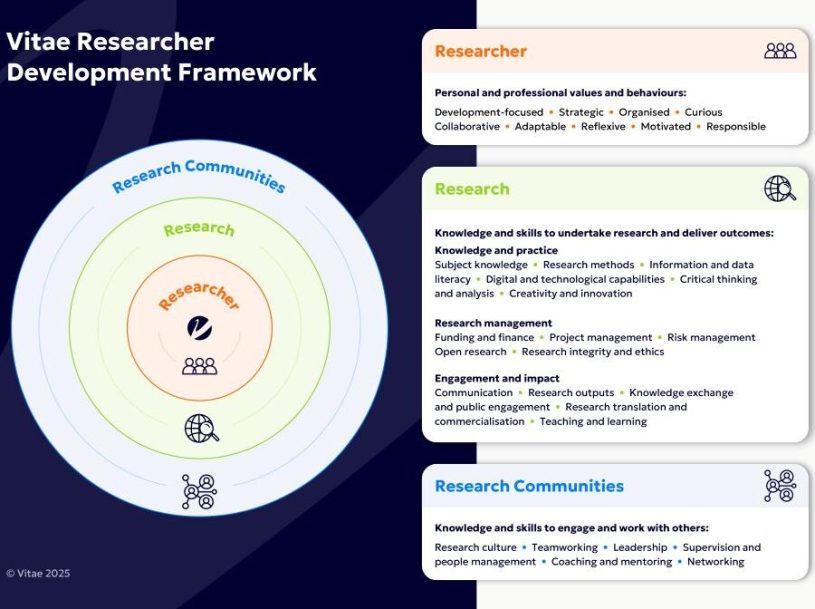
The RDF 2025 keeps the idea of phases but rebuilds the structure into three nested domains, with the individual researcher placed right at the centre as the entry point:
- Researcher – the inner domain (sub-domain 1): who you are as a researcher, your development, values and approach.
- Research – the middle domain (sub-domains 2, 3 and 4): the knowledge, skills and behaviours of actually doing research.
- Research Communities – the outer domain (sub-domain 5): working with and within the wider communities research depends on.
There are 31 descriptors in total, grouped into themes and allocated across those domains, and each descriptor has up to four phases representing stages of progression. The refreshed language brings in the things that were missing before – knowledge exchange, research integrity, open research, digital and innovation skills, research culture and career mobility across sectors.
The shift I like most is putting the researcher at the heart of it. The 2010 version could feel like a checklist you were measured against; the 2025 version reads much more like something you sit inside and work outwards from.
A note before you dive in
The single most useful thing I can tell you is the same advice I’d have given for the old version: don’t try to tackle the whole thing at once. It’s a career-lifetime document, not a to-do list. A well-rounded researcher develops a handful of selected descriptors at any given time, not all 31. If you’re a PGR, you’ll mostly be benchmarking and developing within the earlier phases – the later phases are there for much further down the line. Save Phase 4 for when you’re a Professor.
How I use it
When I first met the RDF I made the classic mistake of trying to map all our activities against it – labelling every session with a domain and feeling very organised about it. I soon realised that didn’t actually mean anything to the researchers I work with. So I changed tack and started designing sessions that explain the RDF and show people how to use it for their own development. That’s still my approach with the 2025 version.
The most common gap I see is that institutions map their provision onto the framework but never show researchers how to actually use it. We can’t expect people to find a tool useful if no one explains what it’s for. So I use it in two main ways: self-assessment, and as a language bank for reviews, applications and proposals.
RDF self-assessment
A self-assessment is a great way to see where you are and where you might want to focus. You rate yourself across the descriptors, and that gives you a development overview you can return to. Using the materials on the Vitae website alongside it can help you identify the areas that need more attention.
Since I don’t subscribe to the official RDF planner, I’ve always built my own in Excel – the kind that produces a spider (radar) diagram so you can see your profile at a glance. For the 2010 version that lived as a file I shared on request. This time I’ve done it properly and made it openly available.
New: Download the RDF 2025 self-assessment tool – an Excel tool covering the full RDF 2025 that produces a spider/radar diagram of your development profile. It’s free to download and reuse.
I’d encourage you to keep a record of your self-assessment and revisit it – it’s genuinely useful when preparing for reviews, job applications or grant proposals, because it gives you somewhere to start rather than a blank page.
Self-assessment and reviews
I use my self-assessment when I’m preparing for my own reviews at work. For reviews I focus on the things I need to progress my career that I can’t easily pick up through my day-to-day activities. Leadership is my usual example: if I want to progress, I need to develop those skills deliberately. I can look at where I currently sit on the relevant descriptor, read what the next phase expects – things like shaping policy – and then go and find opportunities that build towards it.
That’s how I justified taking on a committee role: being able to point at the framework and say “here’s the phase I’m aiming for, here’s how this role gets me there, and here’s the benefit to the institution” makes the conversation about time and support a much easier one to have.
Self-assessment and job applications
The other place the RDF earns its keep is for job applications. I use its wording to help write my CV, cover letters, and the bits where you have to explain how you meet the essential and desirable criteria. The discipline-agnostic language is brilliant for articulating transferable skills – things like project management, team working or teaching – without getting bogged down in the specifics of your field.
My tip: search the framework for the key terms used in the job advert, find the phase that best describes you, and use that wording as your starting point. Then elaborate with your own projects and experience. Having the generic phrasing to build from makes getting started so much less painful.
Where to start
Pick one domain or even one descriptor that feels relevant right now. Read across the phases to see what progression looks like. Do a quick self-assessment so you’ve got a baseline. And then choose just a couple of areas to actually work on – you can always come back to the rest.
If you want to know more about running a “Getting started with the RDF” session, or you’d like to chat about the self-assessment tool, please get in touch – I’m always happy to share how I use it.
AI usage statement
This post was written with some AI assistance, described using the AIR (AI in Research) framework, Outreach stage:
Outreach – A2/A3 (moderate). AI was used to help structure and draft this blog post from my existing 2021 post and my notes on the RDF 2025, and to adapt it for an online audience. I directed the framing, the examples and the opinions throughout, verified the changes to the RDF against Vitae’s published materials, and edited the final text. I remain responsible for all content.

